Showing posts with label encryption. Show all posts

Friday, May 23, 2014

Beginner's Truecrypt File Encryption Guide

Disclaimer:
I hereby excuse myself of all responsibilities for the posting of this guide on the use of Truecrypt. Anyone following this guide on the use of Truecrypt are liable for the use at their own risk. By following any steps of this guide, you (the reader) have willingly bound yourself to this Disclaimer and have excused me of any responsibilities on this guide's procedures and recommendation on the use of Truecrypt or any other digital components being used together with the use of Truecrypt and you shall be solely responsible for the use of Truecrypt and any other digital components being used together with the use of Truecrypt.


Summary:
This guide on the basic usage of Truecrypt teaches beginners the basic procedures and steps in creating and utilizing their very own Truecrypt secure volume to store sensitive secrets securely away from prying eyes.


Basic Information:
Truecrypt does not encrypt files individually but rather creates a secure volume to store files within that secure volume. Think of a secure volume as a secure folder or a secure virtual device (it is considered a virtual hard disk volume by the Operating System) where you store your collection of data files in a secure collection called a secure volume.


Operational Security:
When you are using Truecrypt, please observe these following guides for your own personal safety due to the fact that if you misuse Truecrypt without proper Operational Security (OpSec) in mind, you are likely going to have someone come along and compromise your secure volumes.
  1. Check for traps or tappings connecting between your keyboard and mouse wires or Bluetooth connectors to the CPU if you are using a Desktop or a Server. If your connecting wires or USB Bluetooth dongle between the CPU and the connecting wires of Bluetooth dongles have suspicious looking adapters that have not been installed by you, take precaution and discontinue and investigate until you feel safe.
  2. Secure volume file names should not have meaning to it. One bad example of a secure volume file name is 'mysecrets.tc'. You are as good as broadcasting to anyone who intrudes or shares the computer that the file is something of a sensitive nature.
  3. Secrecy of secure volume master passwords are paramount. You must find a way to secure the password without leaking or sharing them. Sharing of passwords are strictly not allowed regardless of scenarios. We will cover on sharing Truecrypt volume on a later chapter but for now, do not share anything. Writing down the password, sealing it in an envelope and quickly locking it up in a safe is one of the most common methods of storing your password away. Never carry the written down passwords anywhere and carelessly leave them lying around as these secret passwords are the key to your sensitive data. You are better off storing your master secret password in a Password Manager (Passwordsafe) or simply attempt to remember it by choosing a passphrase that you can easily recall.
  4. Do not unnecessarily reveal the existence of your secure volumes.
  5. Dismount your volumes when you have done all your work and quit the Truecrypt program if possible.
  6. If you have any sensitive files you want to create, please try to create them within the secure volume as it provides more security than to create a file outside the secure volume on your Desktop and later copying it into the secure volume. Computer forensics analysis maybe able to recover files created on your Desktop if you create the files on the Desktop before moving it into the secure volume.
  7. It is best if you limit the sizes of your secure volumes (recommended between 1 to 5 MB per volume) as huge file sizes attracts attention. Having multiple small volumes work better but can be confusing to organize them so you need some form of unrecognizable naming convention that seems random and only you know the meaning of the secure volume names. If you want to have one big central secure volume, you must take all your attention required to secure and keep it protected (not saying that smaller volumes means you can be careless).

Steps:
  1. Download Truecrypt (http://www.truecrypt.org/downloads).


  2. Run the installer and click 'Yes' to all.
  3. Click on the Truecrypt program.

  4. Create a new volume to store your sensitive files by clicking on the 'Create Volume' button. A 'Truecrypt Volume Creation Wizard' window should appear.

  5. Select the default 'Create an encrypted file container' and click 'Next >' to continue.

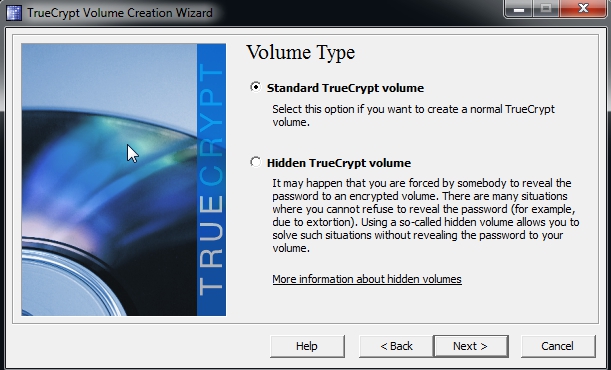
  6. You will be asked to choose your volume type and you should select 'Standard Truecrypt Volume' for now.
  7. Type or select the file you want to use as your Truecrypt volume. I would suggest you to create the secure volume file in the 'C:\' drive location first and then copy it to wherever you want. Make sure you copy and SHIFT+DELETE the file in the 'C:\' drive once you have copied it out. The filename should be meaningless to anyone except probably you. If you want a truely secure file name that no one knows the meaning including yourself, you can use a random generator (http://www.random.org/strings/) to generate a random file name.


  8. Click 'Next >' and you would be shown an 'Encryption Options' to select your encryption algorithm. Select 'Serpent-Twofish-AES' for your 'Encryption Algorithm' and select 'RIPEMD-160' for your 'Hash Algorithm'. Click 'Next >' to continue.


  9. Select on a volume size you want for your volume. Your storage capacity would be slightly smaller than the volume size you have selected because you need to store other file information inside the encrypted volume. Click 'Next >' to continue.

  10. Select a volume password for encrypting your volume. Please choose your passwords wisely and make sure you take utmost care of your passwords. Click 'Next >' to continue. If you are warned that you are using a short password, in the screen below, you can click 'Yes' to continue to use the password you selected or click 'No' to select another password that is much longer. Do NOT panic when you are warned of the short password as shown in the picture below. You are NOT FORCED to use a long password. You may use a short password as long as you choose it carefully ! Stick to common sense like not using a commonly known password and mix the letters and numbers in your passwords and do not re-use old passwords. The stronger your password (more letters, numbers, special characters and longer passwords) the harder an adversary needs to work to attempt to crack your passwords.


  11. You would be asked to choose a 'Volume Format'. We shall use the default volume format (FAT format) so do not touch the format unless you know what you are doing. Start moving your mouse randomly across the window to generate some random secrets as part of the encryption mechanism. You will see the 'Random Pool' changing all the time as you move your mouse randomly. Once you are satisfied, click 'Next >'.

  12.  You will be notified that your volume has been created. Click 'Yes' and 'Exit' to finish the creation.


  13. Once you are done, a file would be created as your Truecrypt volume to store your sensitive files. If you use a text editor to open the file, it should look like a bunch of random unreadable binary. You should avoid opening the file by the means of a text editor to prevent accidental corruption of the binary. You may want to backup this file as often as possible. Below is a created file shown on the Desktop and also a small snapshot of the random binaries when carefully opened using a text editor.


  14. To open the Truecrypt volume for use (it is called mounting a volume), Click on a Drive to allocate a Drive (E:\, F:\ ...) to mount the volume onto. Click on 'Select File' and select your Truecrypt volume file to mount for use. Click 'Mount' to mount the selected file on to the selected Drive. In this picture below I have selected 'H:' drive for use. You may select any free drive to use. Please ensure that the 'Never save history' option is ticked to prevent saving a history of visited volumes to prevent any knowledge of your activities leaked.


  15. You will be prompted to enter your password and when you have entered your password click on 'OK' to continue.


  16. Once you have successfully mounted the volume, you will see your volume mounted next to your 'Drive' with the volume file size, encryption algorithm used and other volume information.


  17. Go to the mounted volume (if you select 'H:', that means you need to navigate to 'H:' drive on your computer using your file manager/browser). You may start creating and adding files to be secured within the volume. If you are going to be away from computer, please close all the text editors or document editors of the sensitive files you are currently editing or using  and click on the 'Dismount All' to dismount all volumes. It is insecure to leave your volume mounted while you are away from your computer even for a short moment as anyone can walk to your seat and take over your computer and do something to your secure volume (making it insecure because you left it mounted and unattended). Dismounting the volume means that the files and volumes would return back to an encrypted state and requires password login again to decrypt the volume and access the sensitive files. When you dismount it should not exist on your list of Drives and volumes anymore as shown in the screenshot below.
    Some files created


    Dismounted all volumes

Thursday, May 1, 2014

Sanity of Cipher Creation Argument

Many conservative cryptographers have argued against making your own ciphers and to only use well known ciphers from cryptographic libraries to do real world encryption. I would not deny the above fact. It is true that creating a cipher unbreakable by oneself is easy due to self-biasness towards one's own ciphers. there are a lot of good ciphers that have been well studied and proven to be secure out there to be used for one's real world applications of data security.

The above statement is true if you are attempting to use a cipher for real world data security application. If your intentions of designing a cipher is for the sake of experimentation and learning more on cryptography, I would personally say it is indeed a good idea that every cryptographer-wannabe or anyone trying to learn cryptography should at least try their hands on designing themselves a cipher to demonstrate the amount of understanding they have learned so far regarding the topics of cryptography.

Bruce Schneier mentions in his blogs and books that the best way an amateur or wannabe cryptographer should begin learning cryptography is to attempt to break someone else's cipher. I would partially agree with Schneier that breaking existing ciphers and protocols are good ways to start learning cryptography. I would personally like to add on that a "newbie" should learn and demonstrate his understanding of cryptography by attempting to create a cipher for fun and attempt to break his own works. The reason I think creating and breaking one's own ciphers should be placed on equal importance with the breaking of other people's ciphers is because you created your own cipher and you should be able to understand how your own cipher work much better than someone who attempts to review your cipher. If you are trying to review someone else ciphers, you need to understand their attempts to express the mechanics of their ciphers in their white papers and not all of these white papers contain clear and concise explanations on the designs of their own ciphers. Some of the white papers simply have a chunk of formula and a "newbie" is expected to quickly grasp at these esoteric looking formulas and try to perform a cryptanalysis on the cipher. Even among expert cryptographers, they may not fully understand each other's papers and may have to communicate among themselves to enquire about the mechanics of other's ciphers. I personally feel that the option of creating a fun cipher for cryptanalysis should be one of the basics of learning cryptography and who doesn't like to have some fun making their own ciphers ?

Wednesday, April 2, 2014

Theoretical Insecurity of Bittorrent Sync

Bittorrent Sync (BTSync) is a new product created by Bittorrent company (whom also brought us the Bittorrent technology) for syncing your data between multiple endpoints or parties while leveraging the Bittorrent network and technology.

The product is a closed source product so all I can analyse is via the published details on their website.

I have not found time to sit down and try out the software and would not entrust my personal files to a closed source product to distribute them across the Internet for syncing therefore I may not have the most accurate picture of it's underlying protocol.

The BTSync technology claims to be "very secure" and here are the theoretical weaknesses that increases my discomfort and unwillingness to try it.

According to the Technology page of the BTSync product (bittorrent.com/sync/technology)...

  1. Uses Crypto API for Windows. - Please use a better cryptographic library that people have trust in like the Mozilla NSS and OpenSSL suite.
  2. According to the technology described for Peer Discovery, BTSync sends out SHA1(Secret):IP:Port to solicit response. It is as good as tell the world that your IP address and Port is open for a specific protocol without people needing to probe your network at all. Sending out a SHA-1 hashed Secret is the greatest danger in this PEX protocol. It is as good as handing out an obfuscated secret key to the world and if someone copies it, they could match it against a rainbow hash table and compromise your security. The better way to do a secret key negotiation and authentication protocol is to secure randomly generate a one-time secure random and use your secret to encrypt the one-time random and distribute it via a key exchange protocol.
  3. Sync Trackers and Torrent Servers are a good way of caching your communications and key exchanges. It is as good as giving your adversaries a public cache of your activities. If you want serious security, you should leave as little traces as possible. Metadata are obviously one of the best traces as you can create an activity record more easily.
 Now we have seen the theoretical major weaknesses of Bittorrent Sync, let's try to fix it.
  1. For the cryptographic APIs, use NSS and OpenSSL. These are highly recognized and open source libraries. For randoms on Unix systems, use the urandom.
  2. The PEX protocol requires an overhaul to include a much more Shared Secret Exchange Protocol I shall describe here (SHASEX). For this SHASEX protocol, it shall remain in the public, unlicensed and unpatented forever and I genuinely am unaware of any such patents or inventions/creations when I write this SHASEX protocol version 1 here.
    1.     We shall assume that all clients have the same shared secret key loaded (K).

    2.     The party that requests communication to all clients generates a random (R) and uses the secret key shared amongst them (K) to encrypt R. Thus, EK(R) and sends it to everyone known.

    3.     Since everyone has the same shared secret, everyone decrypts the random which is no used as a shared negotiation key so that every client can establish their unique session keys. All clients would randomly generate their own session key independently with the requestor. Let U be the unqiue random each client generates at random for their own session keys. Now all clients would use the R random to encrypt their U random thus. ER(U) and sends it to the requestor.

    4.     The requestor would consolidate all the client's session key, U, and communicate to them using their own session keys (no sharing of session keys for privacy).

    5.      By this method, when an attacker from the outside looks at this protocol, all he sees are encrypted values moving around, not plain hashed keys. When the attacker views the session keys, they will have values that are not the same due to the usage of different session keys. Thus, if an attacker were to collect all the encrypted session keys, he would need to break a variety of keys in order to get to the same data and the same data, due to being encrypted with different session keys that are securely generated, would also appear different thus making cryptanalysis even harder.

    6.     The weakness of this SHASEX protocol to my knowledge and is an unintended consequence of such distributed, decentralized and lightweight design would be to compromise one of the clients hosting the same shared secret keys, intercept all their keys and do a man-in-the-middle.... that if ... the attacker manages to know the secret key by compromising any of the clients. To prevent the stagnation of secret keys, it is best to discard and regenerate shared secrets everytime a session has been ended. The requestor would have to generate a random shared secret and encrypt them with the session keys, distribute the secrets, before closing the connection.

  3. To try to lessen footprints on servers and trackers, try to use less of them.
These are all the comments and recommendations I have now for the improvement of the BTSync protocol.

Wednesday, October 19, 2011

Encrypting your files

Encrypting your file system is a good way to prevent attacks from attacking the content of the file system externally where the contents are in encrypted form in the physical devices. The big trouble comes when your file system is decrypted at the moment when you are using the file system itself.


Below are some scenarios that would represent possible scenarios that I have mentioned.


Running your Operating System (OS) while some trojans managed to sneak into your OS. In such a case, even if you have a highly secure encrypted file system, the trojans present an insider threat as they exists within your file system and hide among your protected contents. No matter how strong your file system encryption is, these trojans existing inside your OS could simply grab your files (when you are using the OS, your file system is being decrypted and thus open to attack) that have been decrypted and send them to their owners.


Another scenario is when a user is being coerced into decrypted their entire file system for aggressors to obtain the plain form of the file system contents. File systems that have strategy to partition and trick aggressors via anonymity of ownership of the content (i.e. Rubberhose File System) could address such a problem.


As you can see, file system encryptions have the limitations of preventing people outside from looking into your file system content. I would not wholly ignore or condemn file system encryption as they are to me an external defensive wall.


I would recommend the use of "internal defense" by encrypting the files sitting inside your file system or devices that you think are important so in the events that a trojan slips in to harvest data on you, it would have a hard time decoding the "internally" encrypted files sitting in your file system. 


It would be better if you can encrypt your files on creation so that copies or temporary files and metadata of the contents will have lesser chances of fragmenting and being copied all over your file system as buffer data or simply to sit there for no reason.


Ultimately, these defensive techniques are to delay aggressors or to make it extremely hard for most aggressors to know the truth of your contents. Forceful coercion, human errors, key and screen logging to to detect the password you type into your file encryption program to decrypt those individually encrypted files are part of the arsenal that could defeat the encryption you have placed on your file system and each important files.


The best security is to simply not have it around at all but it is nearly impossible.


To summarise this short article, do not solely rely on encrypting your file system and devices. Encrypt the files inside the file system and devices that you think are important in an event your file system or OS is breached. There is no "ultimate security" for now.

Tuesday, October 11, 2011

Reacting to a hacked email account

In an event your email account or your friend's email account security have been breached, I have some ideas below that might help.

The reason I am writing all these is I have seen many people's accounts being used to send spam (because their accounts are hacked) and no one tells their friends about the breach so the correct reaction could not be taken and probably be deleted or sent to the spam mail or trash. Another reason is no one bothers about their accounts being hacked and be used for spam because their emails are not important to them. The huge mistake is, the usage of their hacked emails as "robots" or "zombies" to control, the person who is in control of the accounts (puppet master) can use these accounts for other malicious deeds and harm others. It becomes a chain reaction and may snowball into something big.

So enough of the talk and let's get into the topic.

My friend's email have been hacked !!!
Yes, you can tell your friend's email have been hacked. He/she sends you suspicious links (so don't click on "juicy" or obviously dangerous links). Another trend to note is the "To" list of people who would be receiving the malicious spam mail. The list of people in the "To" field (whoever that would receive the malicious spam mail) would be alphabetical. Who would ever be so careful to include people into the "To" list of receivers of an email in a very neat and well thought out alphabetical fashion other than a computer program ?

To summarise, you would notice a weird link in the email or some attachment that makes no sense and the list of "To" people (which would include your own email address) would be so neatly adjusted in an alphabetical fashion.

So how do you react ? Firstly, take a screenshot and forward back the link as an evidence to your friend's email (hoping he/she can still access his/her account). Contact your friend via a channel they usually would and tell them to change the password to something else that's not some default passwords people usually use (good password selection policy). Also advise your friend to change all other accounts that he had used that compromised account to register as well. The notion is that the intruder might have used the email account to request for password resets or some emails might contain passwords from account registrations that people might refuse or forget to change. Finally, if it's possible, ask your friend to alert the email provider of a possible breach so that the email provider can investigate their own security measures and carry out some security audits to ensure other users are safe.

My email have been hacked !!!
Ok, do not panic. Attempt to change the password in the email account and the other accounts linked to that email account that have been compromised. If you are locked out of your own accounts of any sorts, then notify the service provider (email or account provider) while they investigate into the matter. Notify your friends to be careful of the compromised accounts. The best way is to ask your friends to alert you any time when they suspect a spam from your account (this arrangement can be done without any event from happening yet as a safety precaution and a good security practise). All you need to do after you have warned the necessary people is to wait for the investigation to take it's course. There is nothing much you can do unless you would consider making yourself a new email account (and secure it safely with a new well-designed password).

Some additional measures to ensure security
Always use HTTPS (secure and encrypted) if the email or website provides one. If there is a setting in the website or email provider's options to turn on HTTPS, use it as the default instead of HTTP (insecure and unencrypted). Change passwords at least once every few months if possible and do not use the same password across multiple accounts. It makes predicting passwords so much easier. Use a password manager like KeePass (http://keepass.info/), KeePassX (http://www.keepassx.org/) or PasswordSafe (http://passwordsafe.sourceforge.net/) that have the capabilities to use strong encryption to store your personal information and passwords. Obviously, use a pretty strong password which you can easily remember to protect your password manager as the login password and DO NOT SHARE PASSWORDS !!

Conclusion
Overall, it is hard to deal with email account breaches as you might not be the owner of the email server. You are usually using a web-based email service someone provides you (Hotmail, Yahoo, Gmail...etc...) which you have very little control over. The above practises are thought out to reduce the damages a compromised account can do by acting responsibly. Do not forget, you might think that your email account is insignificant but it can be used to create bigger threats.


© 2011 Thotheolh / ThothTech. Part or whole of this article can be reproduced or quoted if their meanings are not distorted, else link them to this article.

Tuesday, July 5, 2011

Do Not DES

Read:

DES and 3DES SHOULD NOT be used in these days as we all know that DES is simply not going to provide a very strong encryption algorithm these days. With this improvement to John the Ripper, I think that DES and 3DES should not be touched anymore and left to some Cryptology museum or some education on history of Cryptology and designs of early computer encryption standards.

AES (especially 256 version), Serpent, Twofish and if the situation is really really constrainted, you may use Blowfish (not advisable these days). These algorithms are known standards. Camilla algorithm is another one you may consider and it is currently gaining popularity and a growing community.

Tuesday, March 22, 2011

Sending sensitive emails

Read:
For all that has been mentioned in the article above, HTTPS, encrypted archives and files... encrypted file sharing services... there's one thing that's so famous and so well known and common it has forgotten and put to the back burner... PGP/GPG email encryption.

Yup, that's it.

You could sign your PGP/GPG email, encrypt it and voila.... it's secure. If your attachments need to be doubly secured, PGP/GPG could allow you to encrypt your files on your computer Desktop for you and then attach it to your email and encrypt your entire email, sign with a signature and send it out to your lawyer.

There are front ends and email plugins for your PGP/GPG tool and even standalone clients where you paste in a message and it encrypts the message for you and you paste it back into your email editor which does not have PGP/GPG capabilities.

Saturday, February 19, 2011

AES-NI

Read:
Hardware based acceleration, aid and execution of the AES encryption is something that is juicy and nice but overall, I wouldn't trust my AES encryption to my hardware to do the job. The reason is simple, you never know whether you could trust the hardware makers for NOT ADDING BACK DOORS in their hardware or some makers simply don't understand how to implement AES correctly and thus make all the mess and make security even weaker or broken. There have been storage devices that claimed to have hardware based AES encryption but more than unlikely would I ever trust AES implemented on hardware because there are manufacturers whose 'AES hardware encryption' were simply NOT AES at all but doing 'XOR-ing on the data bytes' or some psuedo encryption.

I would rather trust a properly implemented and trusted software based AES encryption where I can see the source codes and make a decision if the implementations are trustworthy and secure for usage or not.

Tuesday, September 28, 2010

Wiretapping in an Illegal way.

Read:
Imagine installing backdoors inside communications. The problem is that any sort of backdoor, no matter how secure, when a hacker finds it, it's sooner or later gonna be GG. Clipper chips... whatever have you, do not think that "SECURITY BY OBSCURITY" is gonna do any good. 


Modifying all software programs and protocols including F2F, P2P ...etc.. to have a backdoor or unscrambling capabilities is also absurd. It makes the programs and protocols even more insecure.

Most government softwares are using those tools developed by the public domain and outsourced. Imagine one of these loopholes and backdoors slipping in. If they meant that ALL protocols and softwares have to provide loopholes, how would they feel if their softwares and protocols have to abide by the same rules and have loopholes and backdoors too ? That would be absurd isn't it ?

They need to have better judgments before making such absurd laws and rules. It would not only hurt others but themselves. 

Look at this points found in the article.

¶ Foreign-based providers that do business inside the United States must install a domestic office capable of performing intercepts.

¶ Developers of software that enables peer-to-peer communication must redesign their service to allow interception.


This is pretty bleak. Seems like the once infamously free nation is sinking into some kind of "Soviet style Iron-Curtain" rule where everything is controlled and no free will is allowed.

What if non-US developers are providing softwares, e.g. open source softwares hosted on Sourceforge or those free and open source hostings ? Are they gonna get the foreign government to arrest those 'dissident developers' and send them to US for torture ? Or maybe they would send out CIA operatives to those countries to execute them ? These are purely exaggerations but according to article here, the US Govt. could do it.

The main point is, stop making those stupid rules and returning to Clinton's clipper chip era or those past eras where encryption and security is only for the military and everyone else should suffer.

Security and Free-Will are everyone's birth rights. Stop taking away security from others. Stop removing free-will of others.

Tuesday, September 21, 2010

Intel's Harkins knows nothing of open source

Read:
And look closely at the line says the following...
Harkins cited mobile apps: "What kind of security do we think is in something that sells for 99 cents? Not much."
Wow... he doesn't know the power of open source. Really... he needs to know something before he starts speaking. Look at Bruce Shneier's PasswordSafe or look at AxCrypt software or look at. Maybe how about TrueCrypt, FreeOTFE or how about GPG? Aren't these good examples of FREE AND OPEN SOURCE and some are even FOSS approved.

So don't look down on open source or 99 cents apps. Free (inclusive of FOSS defined Freedom) apps can be really hard to crack or defeat. That is partially why the US government is afraid of strong encryption and security in the hands of everyone and maybe still is having that very fear.

So don't blindly state a statement unless you have a damn good explanation and good backing and concrete evidence.

Sunday, August 8, 2010

UAE and Saudi attempts to ban RIM


It has been going on for a while where some governments (for now is the UAE and Saudi Arabia) attempts to block the use of RIM. I wouldn't bother to list some sample sites for reading as I usual do since these news are all over the place and widely available.


Well, that's too bad for Obama's use of his personal Blackberry if he visits UAE and the Saudis.

Many people can claim that this and that are done in the name of security but how much can you justify your claims if you make such a claim ? How effective is it to prevent terror if someone (some government) manages to get RIM to release all it's data to them in plain and they (whoever these governments are) gets them ? 

There's just too much information out there and sad to say, most data-mining programs are very prone to false positives.

Besides false positives, anyone could encrypt their messages before hand without relying on RIM's 'secure' channels and servers and there is nothing RIM could do ?

So how do you get good intelligence ? Rely more on good on the ground intelligence training in combination with technology rather than allow technology to dominate your intelligence gathering and getting too engrossed with technology than practical on the ground intelligence.

Oh... and do you know that banning stuff is classified as breaching of human rights ? If you do it, you might find it even harder to obtain FTAs and enter the WTO or maybe getting scrutinized by other nations.